Evaluation
Description and Background
One main part of Monitizer is its evaluation. It needs two key elements:
a fully specified monitor (i.e. not only a monitor template)
OOD data to evaluate on
Since it is not always desirable to optimize the monitor already and because it is often done in related work, we also include the computation of the AUROC. “A receiver operating characteristic curve, or ROC curve, is a graphical plot that illustrates the performance of a binary classifier model (can be used for multi class classification as well) at varying threshold values.” (see Wikipedia). Many monitors use some threshold that determines whether an input is ID or OOD. For such monitors, we can compute the ROC by scaling the threshold. The AUROC is then the area under the curve.
Monitizer allows for two possible evaluation modes: full (or test) and auroc. It evaluates the monitor on a set of OOD data. As we discuss in our paper (ArXiv), it is not entirley clear what OOD sets are a reasonable choice. We provide an automatic generation of OOD images based on certain modifications and a hand selected collection of OOD images for existing datasets.
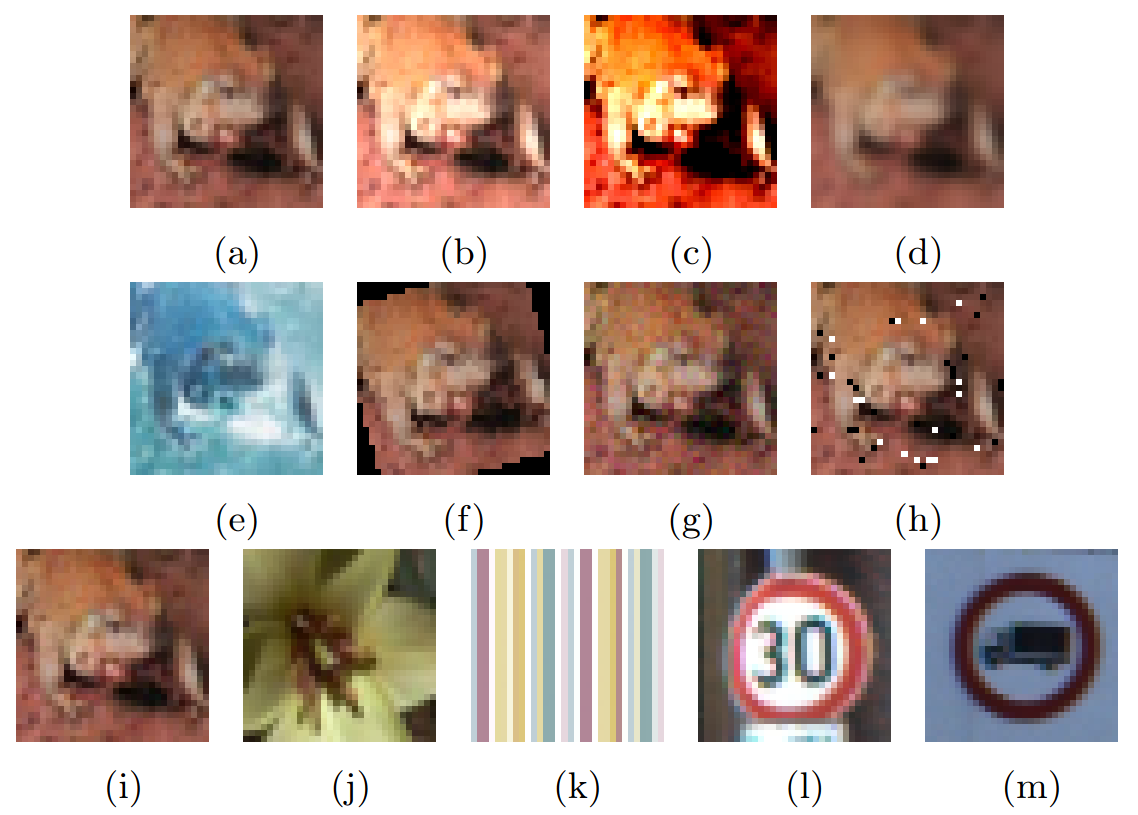
In the picture, we demonstrate the OOD classes for the CIFAR10 dataset:
ID image
brighter
increased contrast
Gaussian blur
inverted colors
rotated
Gaussian noise
Salt-and-Pepper noise
Unseen object from CIFAR-100
New world from DTD
New world from GTSRB
Not OOD
b - i are the automatically generated images (where for i you need a trained NN). j - l are hand collected by us. The class unseen object (j) describes objects in the image that are different from the images in the ID dataset, but in a similar “style”. The class new world (k) describes a completely new image that has no resemblance to anything in the ID dataset. The image (m) contains the image of a truck, which is something that appears in the ID dataset. Therefore, this should not necessarily be used as an OOD image and is, thus, not part of the OOD datasets.
The OOD classes
Monitizer provides automatically generated OOD inputs for any dataset, even custom implemented ones (see Implementation of a dataset). The classes are the following:
Noise/Gaussian
Noise/SaltAndPepper
Perturbation/Contrast
Perturbation/GaussianBlur
Perturbation/Invert
Perturbation/Rotate
Perturbation/Light
Implementation Details
The evaluation happens in one Python script monitizer.evaluate.
Starting point is the function monitizer.evaluate.evaluate(), which then either calls monitizer.evaluate.evaluate_on() for the standard evaluation or monitizer.evaluate.evaluate_auroc() for the evaluation of the AUROC.